





Key ideas
- DigCompEdu and TPACK help guide resource selection and instructional design by relating objectives, pedagogy, technology, and content; they do not guarantee the effectiveness of a tool.
- Simulations, virtual laboratories, and sensors can support inquiry activities, but their models and measurements have limitations; the proposed classroom activities are not measured efficacy outcomes.
- Teacher training can incorporate practice, feedback, and support, together with planning for accessibility, privacy, security, connectivity, and cost; the cited sources do not prove universal efficacy.
Pedagogical purpose before the tool
The European Framework for the Digital Competence of Educators (DigCompEdu), developed by the European Commission’s Joint Research Centre (JRC), organizes educators’ digital competence into areas that include professional engagement, digital resources, teaching and learning, assessment, and empowering learners. The framework guides decisions such as selecting or creating resources according to the objective, context, pedagogical approach, and characteristics of the group; protecting content and data; and analyzing evidence of learning. It is a professional reference, not a trial of an application or proof that incorporating technology, by itself, improves learning (DigCompEdu, European Commission — JRC).
The TPACK framework complements this perspective by relating technological, pedagogical, and disciplinary knowledge. Knowing how to use a tool is not enough: how something is taught and which scientific concept is addressed also matter. Both frameworks help guide teaching decisions, but they do not guarantee the effectiveness of a tool or activity.
In practice, it is advisable to first define which scientific concept is to be taught, what difficulty might arise, and what performance would demonstrate understanding. Then one can choose among a simulation, a virtual laboratory, sensors, or non-digital materials. The question is not whether a tool is novel, but whether it helps achieve the objective and makes it possible to observe students’ reasoning. DigCompEdu also includes accessibility, differentiation, and active participation: educators’ competence is not limited to technical proficiency with the resource.
A 2026 systematic review on digital competence in physics teaching, based on searches in Scopus and English-language publications, brings together studies with heterogeneous designs. It describes the potential of simulations and virtual laboratories when aligned with pedagogical purposes, but cautions that perceptions, self-assessments, or expert validations are not enough to demonstrate improvements in learning. The review provides context about the field; it does not estimate a universal effect, and its conclusions do not automatically extend to all sciences and levels (review on digital competence in physics education).
Designing activities that make it possible to examine reasoning
An inquiry sequence can begin with a question, ask for a prediction, vary one condition while keeping others constant, record observations, and justify an explanation. A digital resource can help explore a phenomenon, but interaction alone does not constitute inquiry. To examine learning, what matters is what the student can explain or do, not only whether they completed an action on screen.
The table presents adaptable classroom proposals, not activities whose pedagogical effectiveness has been proven. In each case, the objective and expected output guide the use of the tool; if it is unavailable, an alternative is suggested that retains an analysis task.
| Objective | Possible resource | Activity | Evidence to examine | Alternative if the resource is unavailable |
|---|---|---|---|---|
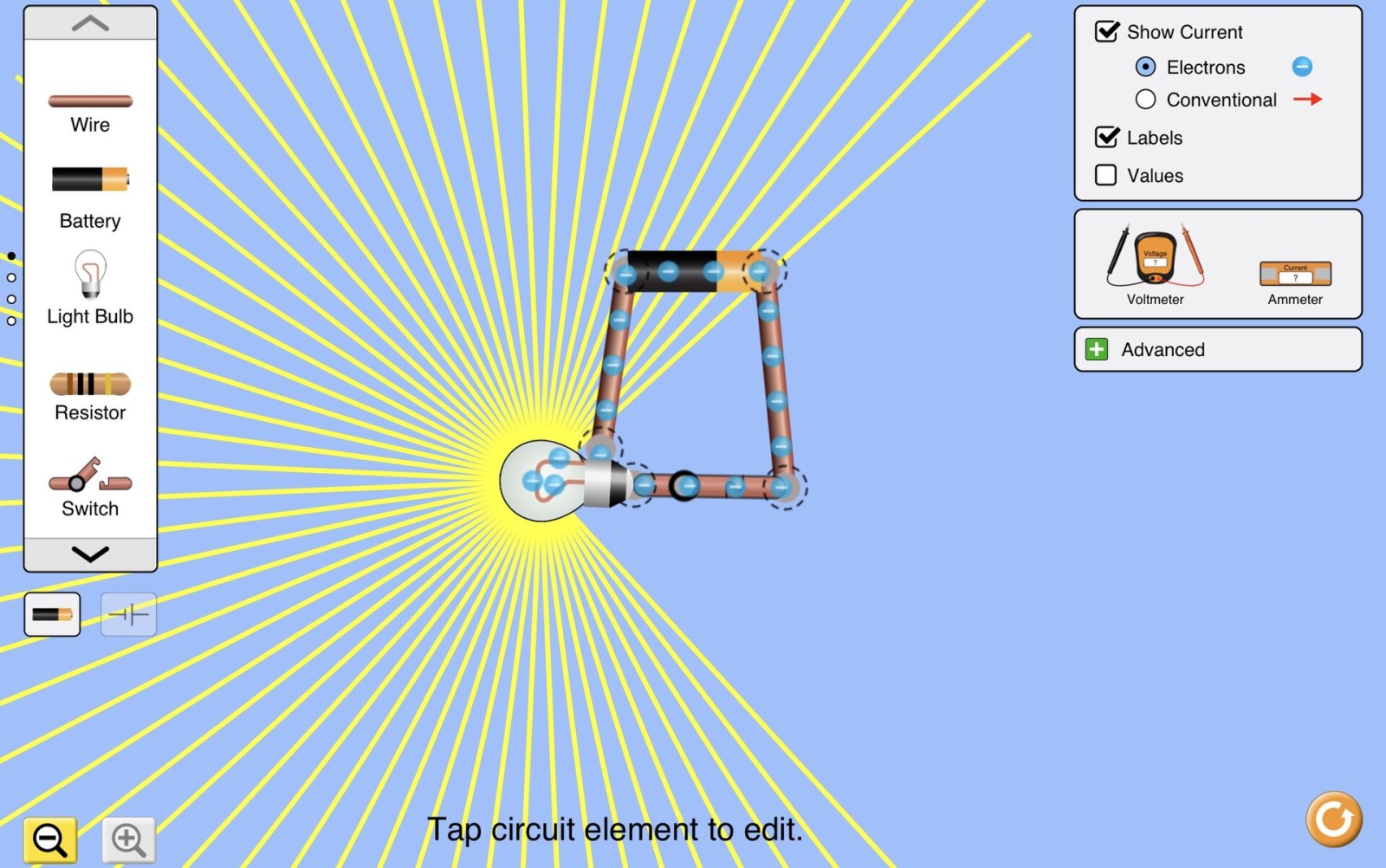
| Analyze how current changes when resistance is varied while the source remains constant. | PhET simulation Circuit Construction Kit: DC. | Predict, build, and test the virtual circuit; record the variables and justify the conclusion. | An explanation linking variables, tests, and model limitations, not just a screenshot. | Analyze tabulated data on paper or, if appropriate and safe, work with a physical circuit and suitable materials. |
| Compare light readings under different conditions. | phyphox Light experiment on a compatible device. | Keep the position and, as far as possible, background light constant; change one condition, repeat, and represent the data using the units shown by the sensor. | A table or graph and an explanation of the variation and measurement limitations. | Use environmental data collected previously by the teacher, identifying its source, on paper or in a spreadsheet. |
| Anticipate a procedure and identify variables and controls. | A virtual laboratory model available in the instructional context. | Predict and justify decisions within the model; then explain which aspects of the procedure it does not represent. | A comparative explanation of the model and the procedure. | An accessible paper-based sequence or teacher demonstration, depending on the context. |
| Distinguish observation from inference when interpreting data. | Printed tables or graphs. | Formulate a question, compare variables, and decide whether the data support an explanation or more observations are needed. | An interpretation that identifies the relevant data and distinguishes what was observed from what was inferred. | The same printed table; when needed, accompany it with a textual description of the graph. |
In the circuit activity, PhET allows students to explore direct-current circuits, components, and current and voltage measurements. Comparing the model with a real setup can help discuss what it represents and what it does not: the simulation does not, by itself, reproduce contact errors or variations in physical equipment. Any hands-on activity requires suitable materials and compliance with the institution’s safety rules; the setup must never be connected to the mains. The proposal does not provide measured learning outcomes (Circuit Construction Kit: DC documentation).
Virtual laboratories, measurements, and practical experiences
A virtual laboratory can help students anticipate procedures and make variables and controls visible before an activity. Students can predict what would change, justify what should be kept constant, and then compare the model with a real practical activity when appropriate. The model can support visualization and preparation, but it does not automatically train students in handling equipment, manual dexterity, or responding to equipment errors or physical safety conditions. If the objective includes those experiences, the virtual activity does not replace hands-on practice or teacher guidance.
In the light example, the phyphox page warns that the ambient sensor is not available to the app on iPhone. It is therefore advisable to check device compatibility before designing the activity, rather than assuming that all phones will work. A sensor reading is also not automatically equivalent to a calibrated measurement of solar power: illuminance and irradiance are different quantities. An instrument study of phone light sensors addresses calibration and uncertainty when measuring solar irradiance; it provides context about measurement, not evidence of the educational effectiveness of the proposed activity (phyphox Light experiment; instrument study of phone light sensors).
If the connection fails, PhET offers options for using simulations offline, including a desktop application with HTML5 and Java simulations and their translations for Windows and macOS. The compatibility and conditions of the specific option should be checked before planning the activity. phyphox allows measurements to be saved and exported; when transferring them to a spreadsheet, units and context must be preserved. Testing resources on the available equipment and preparing a paper-based alternative helps plan for continuity, although that alternative is not identical to interacting with the simulator (offline access to PhET; phyphox frequently asked questions).
Training to design, rehearse, and review
A brief technical session on an application’s controls is not, by itself, professional development. The Education Endowment Foundation (EEF) professional development guidance describes mechanisms such as modeling, practice, feedback, social support, and follow-up to consolidate the application of what has been learned. Drawing on this framework, a proposal for future teachers could include exploring a resource as a student, designing an activity, rehearsing it through microteaching with peers, receiving feedback, and reviewing the work produced when implementing it with a mentor’s support. Time and institutional support are also needed to make rehearsal and review possible.
The EEF guidance concerns practicing teachers, so applying its mechanisms to initial teacher education is an adaptation, not a sequence validated for that group. A 2024 study based on focus groups with advanced secondary-school student teachers at a European university describes perceptions that self-study can help develop skills and that collaboration and guidance for teaching digital competencies are also desired. It includes different subjects and does not measure a causal improvement in student learning. It provides context about expressed needs, not proof that a particular professional development format works for all future teachers (EEF professional development guidance; study of future teachers’ perceptions).
When reviewing an activity, one can ask whether the instructions helped students make a prediction, whether the records retained units, whether the explanation distinguished evidence from inference, and whether there were access barriers. These questions can help improve the design, but they do not, by themselves, constitute a causal evaluation of the technology.
Inclusion, privacy, and conditions of use
Accessibility is planned alongside the activity. CAST’s Universal Design for Learning Guidelines propose multiple means of engagement, representation, and action and expression. In a data interpretation task, for example, one can provide a table in addition to the graph and allow an oral or written explanation. Depending on the group’s needs and the resource’s features, it is advisable to check keyboard operation, contrast, magnification, screen-reader compatibility, and text or audio alternatives. One should not assume that every simulation offers the same options or that an adaptation guarantees accessibility by itself (CAST Universal Design for Learning Guidelines).
Technology should not make a personal phone a requirement. Schools can plan to provide their own devices, enable shared work, or offer a paper-based alternative. For apps and platforms, the school should know what data are collected, what permissions are requested, who can access the information, where and for how long it is retained, and how it is deleted. Identifiable work or data should not be uploaded to unauthorized services; files should be shared through approved channels. The Spanish Data Protection Agency’s guidance for educational centers offers context-specific guidance for schools in Spain and is marked under review; it is not a universal rule and does not replace checking the conditions applicable at each school (AEPD guidance for educational centers).
The total cost must also be considered: equipment, operation, maintenance, connectivity, and training, as well as the initial license. The recommendations in UNESCO’s 2023 GEM Report suggest considering relevance, equity, sustainability, and independent evidence, while attending to the needs of students and teachers. When evaluating evidence about a technology, it is advisable to examine the methods, sample, measures, potential biases, funding or supplier interests, and relevance to the context. These are recommendations to guide decisions, not a guarantee that every resource is free or suitable in every context (recommendations from UNESCO’s 2023 GEM Report).
Evaluating with caution
Before implementing a proposal, one can agree on the expected scientific outcome and what evidence would demonstrate it. Initial and subsequent explanations, a transfer task involving another case, and monitoring students’ work can help review their reasoning. It may also be useful, when feasible, to compare the proposal with a reasonable alternative. Prior knowledge, time, teacher support, and access barriers matter when interpreting results.
Satisfaction, self-reported motivation, or screen time do not, by themselves, amount to scientific learning. A before-and-after comparison in a single group also does not demonstrate that any difference is due to the tool. Attributing changes to the resource would require learning outcomes, appropriate comparisons, and attention to design limitations; an association or favorable perception does not demonstrate causality.
The cited materials serve different purposes. DigCompEdu and TPACK are guiding frameworks; CAST’s guidelines and UNESCO’s recommendations guide design; the study of future teachers reports perceptions; the sensor study concerns measurement; and the review on physics education synthesizes studies with heterogeneous methods. None of these materials, individually, demonstrates that a simulation, sensor, or training format improves learning in every classroom. A defensible pedagogical decision links the resource to a clear objective, gathers relevant evidence, and recognizes the limitations of the context and the measurement.
What we know and its limits
DigCompEdu and TPACK are guiding frameworks, not efficacy trials. The review on digital competence is limited to physics teaching, publications in English indexed in Scopus, and heterogeneous designs; it does not allow for a quantitative synthesis or demonstrate universal causal effects. The study of future teachers describes perceptions, includes different subjects, and does not measure causal effects on learning; the EEF guide concerns practicing teachers, so applying it to initial teacher training is an adaptation. The sensor study is instrumental, not pedagogical. The proposed activities are adaptable examples, not interventions with demonstrated efficacy. The AEPD guide is Spanish contextual guidance and is under review.
Original sources12
The original sources for exploring this explanation and its limits.
-
European Framework for the Digital Competence of Educators: DigCompEdu
European Commission — Joint Research Centre
· 10.2760/159770
Digital competence framework for teachers: resources, teaching, assessment, inclusion, and professional development. -
A systematic review of digital competence in physics education in the era of industry 4.0
Discover Education — Nurazmi and Bancong
· 10.1007/s44217-026-02294-z
A 2026 review of digital competence in physics education and the conditions for meaningfully integrating technologies. -
Pre-Service Teachers’ Perceptions of Their Digital Competencies and Ways to Acquire Those through Their Studies and Self-Organized Learning
Education Sciences — Göltl, Ambros, Dolezal and Motschnig
· 10.3390/educsci14090951
A 2024 study on the perceptions of prospective secondary school teachers and their need for supported training. -
Circuit Construction Kit: DC
PhET Interactive Simulations — University of Colorado Boulder
A direct-current electrical circuit simulation for exploring models and testing predictions. -
Light — ambient light sensor experiment
phyphox — RWTH Aachen University
Documentation for the Light experiment and its compatibility limitations with light sensors. -
Smartphone Light Sensors as an Innovative Tool for Solar Irradiance Measurements
Sensors — Di Laccio and colleagues
· 10.3390/s24217051
An instrumental study from 2024: calibration and limitations when using phone light sensors. -
Effective Professional Development — Guidance Report
Education Endowment Foundation — Joe Collin and Ellen Smith
An evidence-review-based guide to continuing professional development: modeling, practice, feedback, and contextual application. -
CAST Universal Design for Learning Guidelines 3.0
CAST
Universal design guidelines for offering diverse ways to engage, represent information, and express learning. -
Technology in education: A tool on whose terms? — Recommendations
UNESCO Global Education Monitoring Report
GEM 2023 recommendations: objectives, equity, independent evidence, sustainability, and data protection. -
Guide for educational institutions — privacy and platforms
Agencia Española de Protección de Datos
Guidance from the Spanish authority on applications, privacy, and the responsible use of school data. -
Offline access to PhET simulations
PhET Interactive Simulations — University of Colorado Boulder
Official offline-use options and conditions to check when planning activities. -
Frequently Asked Questions — phyphox
phyphox — RWTH Aachen University
Documentation on sensor availability, saving, and exporting measurements.
Image credits
PhET Interactive Simulations — PhET Circuit Construction Kit screenshot · PhET, screenshot by Dudhhr · Wikimedia Commons · CC BY 4.0 · Original source · CC BY 4.0 · Resized and re-encoded as JPEG; full framing preserved.